

• CIN will be sunsetting the official CIN app! The app will be turned off on Saturday, August 1st. Thank you to everyone who used the app to post updates. It just was not adopted as much as hoped.

The way to redeem A+ Core 1 Access Code

NATUNA

Well-known member
  • Apr 9, 2020
    237
    989
    40,046
    Viet Nam
    Hi All,
    I have just tried to redeem the Access Code for A+ Core 1 and do successfully. You can try with those steps:
    Step 1: Login into the main account with https://login.comptia.org
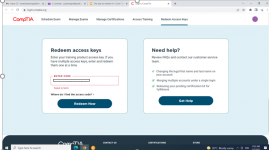
    Step 2: Scroll down and input the access code (from Mr. Stephen) into the Redeem Access keys and press Redeeem Now
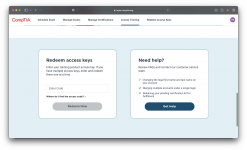
    Screen Shot 2022-05-05 at 09.28.18.png

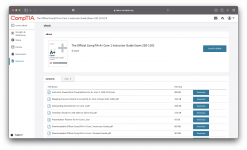
    Step 3: Wait the system to process and press Access new my training button to access the course.
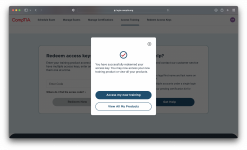
    Screen Shot 2022-05-05 at 09.28.09.png

    Step 4: Let's go with the course

    Screen Shot 2022-05-05 at 09.37.01.png
     
    Hi All,
    I have just tried to redeem the Access Code for A+ Core 1 and do successfully. You can try with those steps:
    Step 1: Login into the main account with https://login.comptia.org
    Step 2: Scroll down and input the access code (from Mr. Stephen) into the Redeem Access keys and press Redeeem Now

    View attachment 793

    Step 3: Wait the system to process and press Access new my training button to access the course.

    View attachment 794

    Step 4: Let's go with the course

    View attachment 795
    Thank you so much, it works successfully!
     
    Hi All,
    I have just tried to redeem the Access Code for A+ Core 1 and do successfully. You can try with those steps:
    Step 1: Login into the main account with https://login.comptia.org
    Step 2: Scroll down and input the access code (from Mr. Stephen) into the Redeem Access keys and press Redeeem Now

    View attachment 793

    Step 3: Wait the system to process and press Access new my training button to access the course.

    View attachment 794

    Step 4: Let's go with the course

    View attachment 795
    Thank for your sharing! It works for me.
     
    Hi All,
    I have just tried to redeem the Access Code for A+ Core 1 and do successfully. You can try with those steps:
    Step 1: Login into the main account with https://login.comptia.org
    Step 2: Scroll down and input the access code (from Mr. Stephen) into the Redeem Access keys and press Redeeem Now

    View attachment 793

    Step 3: Wait the system to process and press Access new my training button to access the course.

    View attachment 794

    Step 4: Let's go with the course

    View attachment 795
    Hello, I tried this and it did not work for me. I am getting a message "Failed to fetch"

    1651739473223.png
     
    • Like
    Reactions: Nadire Ali
    Hi All,
    I have just tried to redeem the Access Code for A+ Core 1 and do successfully. You can try with those steps:
    Step 1: Login into the main account with https://login.comptia.org
    Step 2: Scroll down and input the access code (from Mr. Stephen) into the Redeem Access keys and press Redeeem Now

    View attachment 793

    Step 3: Wait the system to process and press Access new my training button to access the course.

    View attachment 794

    Step 4: Let's go with the course

    Thank you this worked for me
     
    Hi All,
    I have just tried to redeem the Access Code for A+ Core 1 and do successfully. You can try with those steps:
    Step 1: Login into the main account with https://login.comptia.org
    Step 2: Scroll down and input the access code (from Mr. Stephen) into the Redeem Access keys and press Redeeem Now

    View attachment 793

    Step 3: Wait the system to process and press Access new my training button to access the course.

    View attachment 794

    Step 4: Let's go with the course

    View attachment 795
    Thank you
    Hi All,
    I have just tried to redeem the Access Code for A+ Core 1 and do successfully. You can try with those steps:
    Step 1: Login into the main account with https://login.comptia.org
    Step 2: Scroll down and input the access code (from Mr. Stephen) into the Redeem Access keys and press Redeeem Now

    View attachment 793

    Step 3: Wait the system to process and press Access new my training button to access the course.

    View attachment 794

    Step 4: Let's go with the course

    View attachment 795
    Thank you!
     
    Hi All,
    I have just tried to redeem the Access Code for A+ Core 1 and do successfully. You can try with those steps:
    Step 1: Login into the main account with https://login.comptia.org
    Step 2: Scroll down and input the access code (from Mr. Stephen) into the Redeem Access keys and press Redeeem Now

    View attachment 793

    Step 3: Wait the system to process and press Access new my training button to access the course.

    View attachment 794

    Step 4: Let's go with the course

    View attachment 795
    These steps worked for me after the second code failed - thanks!!
     
    • Like
    Reactions: NATUNA